Is This IPTV Renewal Email Real? How to Spot Phishing Messages
Posted by Tom Holland
Filed in Card Games 1 view
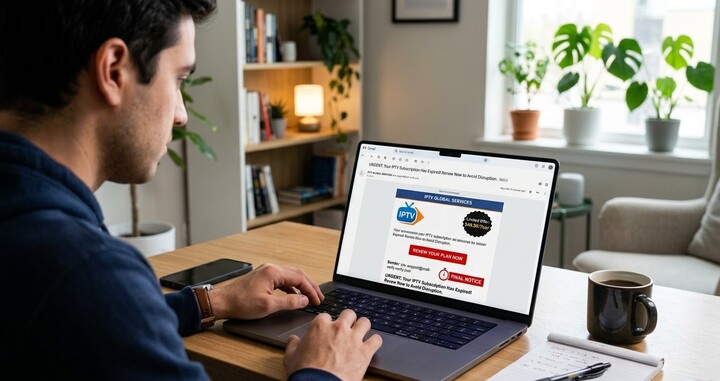
“Your subscription expires today. Renew now to avoid losing access.” It looks official, it creates urgency, and it asks you to click a link and enter your card details. Phishing messages like this are common, and subscription services are a favorite disguise because people expect renewal notices. In this guide, we’ll show you how to check a message before you act, what the warning signs are, and what to do if you’ve already clicked, so your IPTV India account and Indian IPTV Box setup stay safe.
This is general safety information, not legal advice. If you think you’ve lost money, contact your bank or card issuer promptly.
Table of Contents
- Why Renewal Emails Are a Favorite Disguise
- Red Flags to Look For
- How to Check Without Clicking
- What Real Renewal Messages Usually Look Like
- Other Channels Scammers Use
- If You Already Clicked or Paid
- Habits That Protect You
- FAQs
Why Renewal Emails Are a Favorite Disguise
Scammers like renewal notices for a few reasons:
- Recurring payments are expected, so a billing email doesn’t seem strange
- Urgency feels natural. A lapse in service is a believable consequence
- Many people use IPTV services that aren’t big household names, so it’s harder to know what a genuine message looks like
- Money and login details are the goal. A fake payment page collects both
Fraudsters also buy or steal email lists, so receiving a message doesn’t mean you’re a customer. Many senders blast the same email to thousands of people and hope some are real subscribers.
Red Flags to Look For
No single sign proves a message is fake, but several together are a strong warning.
The sender:
- A mismatched or odd email address, such as a random string of characters or a free webmail address claiming to be a company
- A display name that doesn’t match the address behind it. On many email apps you can tap or hover over the name to see the real address
- A domain that looks almost right, with a swapped letter or extra word
The greeting and wording:
- Generic greetings like “Dear user” or “Dear customer” when the provider normally uses your name
- Spelling and grammar errors, though polished scams exist too
- Threats and deadlines, such as “your account will be deleted in 24 hours”
- Emotional pressure or too-good-to-be-true discounts
The request:
- A link to log in or pay, especially if it leads to an address that isn’t the provider’s usual site
- Requests for card numbers, passwords, one-time codes, or personal data by email, reply, or an attached form
- Unexpected attachments, especially compressed files or documents asking you to enable content
- Requests for payment by gift cards, cryptocurrency, or wire transfer
- Requests for remote access to your device
The details:
- An amount or plan that doesn’t match yours
- A renewal for a service you don’t have, or one you cancelled
- Invoice numbers or account details that don’t match your records
How to Check Without Clicking
- Don’t click links or open attachments in the message
- Go to the provider yourself. Type the website address you already know into your browser, or use a bookmark you saved earlier, and log in to your account. Check your subscription status and renewal date there
- Compare with your records. Look at your last receipt, your account page, or your payment history
- Check the sender’s address closely, and compare it with emails you know are genuine
- Hover over links (on a computer) or press and hold (on a phone) to preview the web address, without opening it. A link that goes somewhere unexpected is a red flag
- Contact support using official details from your account page or original receipt, not from the suspicious message
- Look at the header and formatting. Be wary of messages that look different from usual ones
- Ask someone you trust, or search for the exact wording online to see whether others have reported it
- Use your email provider’s report phishing button, then delete the message
If your account page says your subscription is active and your renewal is weeks away, the message is almost certainly fake.
What Real Renewal Messages Usually Look Like
Genuine notices tend to:
- Come from an address you’ve seen before, from the same domain as your earlier receipts
- Match your plan, price, and renewal date
- Let you manage the renewal by logging into your account on the provider’s official site, rather than demanding card details by email
- Not ask for your password or full card number by email
- Give you reasonable time, and not threaten immediate deletion
- Include contact details that match the official site
Providers vary in how they communicate, and some send very little. If you aren’t sure how yours normally behaves, ask them what their billing emails look like and from which address they come.
Other Channels Scammers Use
The same tricks show up beyond email:
- Text messages, often with a short link
- Messaging apps and social media direct messages
- Phone calls, sometimes pretending to be “billing support”
- Pop-ups and fake support pages claiming your device has a problem
- Fake accounts imitating a provider on social platforms, offering “special renewal deals”
The same rules apply: don’t act on contact you didn’t start, verify through official channels, and never give out passwords, codes, or card details.
If You Already Clicked or Paid
Act quickly, and stay calm.
If you only clicked a link:
- Close the page without entering anything
- Run a security scan on your device
- Update your browser and operating system
If you entered your login details:
- Change your IPTV account password immediately, and change it anywhere else you used the same password
- Turn on two-factor authentication where available
- Check your account for changes
If you entered card details or paid:
- Contact your bank or card issuer right away. Ask about blocking the card, replacing it, and disputing any charges. Time limits apply
- Watch your statements closely for unfamiliar charges
- Keep screenshots and the original message
If you installed something or gave remote access:
- Disconnect the device from the internet
- Remove anything you installed, and run a security scan
- Consider a factory reset, and change passwords from a clean device
Then:
- Report the message to your email provider, and to relevant consumer protection or fraud authorities in your country. In the US, options include the Federal Trade Commission
- Warn family members who share your accounts
- Be alert for follow-up scams, such as someone offering to recover your money for a fee
Habits That Protect You
- Use a password manager and unique passwords for every account
- Turn on two-factor authentication when it’s offered
- Bookmark your provider’s site and use the bookmark instead of links in emails
- Keep a short list of your subscriptions and renewal dates, so surprises stand out
- Pay with a method that offers buyer protection
- Keep devices and apps updated, and use official app sources only
- Slow down. Urgency is a tactic, so give yourself time to verify
- Share what you learn with older relatives, who are often targeted
FAQs
1. How can I tell if an IPTV renewal email is fake?
Check the sender’s address, look for generic greetings, urgent threats, and requests for card details or passwords, and verify by logging in to your account through a site you type yourself.
2. What if the email has my real name and plan?
Details can be stolen or guessed, so a correct name doesn’t prove it’s genuine. Verify through your account or official support.
3. Is it safe to click “unsubscribe” in a suspicious email?
It’s safer not to click anything. Report and delete the message instead, since “unsubscribe” links in scam emails can confirm your address is active.
4. What if I already gave my card details?
Contact your card issuer immediately, ask about blocking the card and disputing charges, and monitor your statements.
5. Will changing my password protect my Indian IPTV Box?
It protects your account, which is what scammers usually want. Also keep your device updated, use official apps, and be careful about remote access requests.
Stay One Step Ahead of Scammers
A few seconds of checking can protect your money and your account. Choose a transparent IPTV India provider that communicates clearly, pair it with a dependable Indian IPTV Box, and always verify before you pay. Explore our IPTV plans today and subscribe with confidence.